
| Vendor: | Larry Kearney |
| Product: | PLR SpamClean Pro |
| Launch Date: | 2025-Dec-07 |
| Launch Time: | 9:00 EST |
| Front-End Price: | 19.95 |
| Commission: | 50% |
| JV Page: | https://zone7810.club/e/spamclean-pro/jvpage/ |
| Affiliate Network: | WarriorPlus |
| Niche: |
SpamClean Pro is one of those rare Chrome extensions that quietly slips into your workflow and then makes you wonder how you ever wrote emails without it.
At its core, SpamClean Pro is built for anyone who relies on email to make money: marketers, copywriters, agencies, coaches, SaaS founders, affiliates, and newsletter creators. Instead of guessing which words or phrases might trigger spam filters, this extension gives you a clear, visual way to see and fix “problem language” before you hit send.
Here’s how it works in practice.
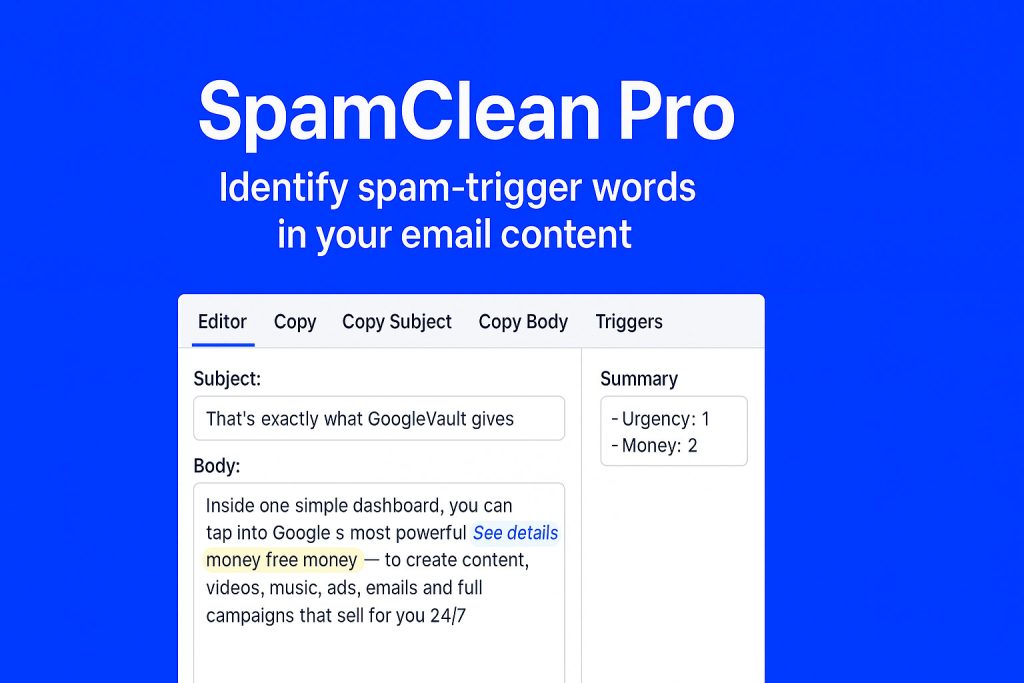
You paste your subject line and email body into the editor. With one click, SpamClean Pro scans your copy and instantly highlights spam-trigger words in different colors based on risk level. You can see at a glance which phrases are low, medium, or high risk, so you’re no longer guessing what might be hurting your deliverability.
One of the standout features is the summary panel. It doesn’t just tell you “this is bad” — it shows which categories you’ve hit (like urgency, hype, money language, scarcity, etc.) and how many times. This is incredibly useful when you want to keep your message strong and compelling, but not so aggressive that it lands in Promotions or Spam.
Then there’s the Subject Alternatives feature. Instead of leaving you stuck rewriting from scratch, SpamClean Pro suggests alternative subject lines that keep the core idea of your email but with cleaner, safer wording. That alone can save huge amounts of time during launches, promos, and daily broadcasts.
The Copy tab is another big win. With buttons like Copy Subject (Plain), Copy Body (Plain), and Copy Subject+Body (Plain), you can copy your cleaned email with proper spacing and line breaks preserved, ready to paste into Gmail, Outlook, autoresponders, or any email platform. It’s a small detail, but it makes the extension feel smooth and professional instead of “hacky.”
Where SpamClean Pro really shines is the Triggers tab. You can browse categories of trigger words, add your own terms, and build a personalized list tuned to your brand and niche. Over time, this becomes your private deliverability playbook — your own “do not use” list that you can refine as you learn what works for your audience and inbox placement.
The overall interface is clean, fast, and focused on one mission: help your emails actually reach the inbox instead of getting buried in spam or promotions. If you’re sending cold emails, running product launches, onboarding new clients, or emailing your list regularly, SpamClean Pro acts like a deliverability coach sitting inside your browser.
If you want higher opens, better clicks, and fewer emails disappearing into the void, this extension is an easy win. Install it once, run your emails through it, and you’ll quickly see why having an “email spam cleaner” in your browser is such an unfair advantage.
Invite your friends to this launch on Facebook:Don't Miss It! Mark Your Calender Now: